Systems engineering
Requirements management with traceability you can trust
AI-assisted requirements management with end-to-end traceability. AI extracts requirements from your specifications with page citations; you take them from stakeholder needs through allocation to verification, with suspect links, reviews and baselines recording what was approved.
Overview
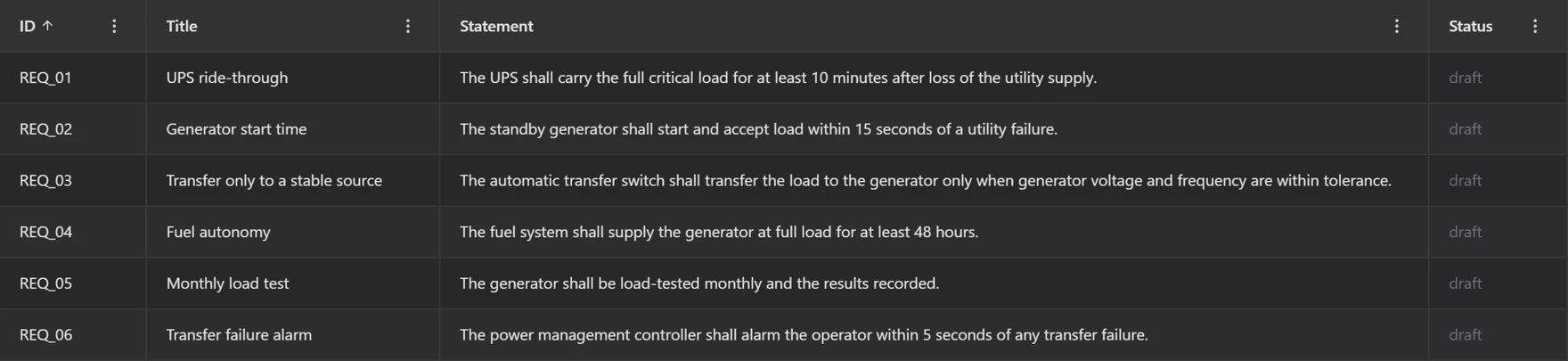
Requirements connect what stakeholders need with what the system must do and how you will prove it. ModelGraphX models stakeholders, their needs and concerns, and the requirements that answer them, with reusable requirement definitions and usages allocated to system elements.
Verification cases record the method, test, analysis, inspection or demonstration, and the results of each run. Typed trace links connect requirements to their sources and to each other; when an upstream requirement changes, downstream links become suspect, and the trace matrix can show only the gaps.
Governance is built in. Reviewers endorse or request changes on a frozen copy, baselines need readiness checks and approval and can be compared, change requests follow a lifecycle, and deleted items can be restored for 180 days.
Capabilities
Stakeholders, needs and requirements
Record who needs what and why, and the requirements that answer each need.
Definitions and usages
Reuse requirement definitions and allocate their usages to system elements.
Allocation by drag and drop
Drag a requirement onto the system tree to allocate it to a part.
Verification cases
Plan verification by test, analysis, inspection or demonstration and record run results.
Trace matrix and suspect links
Typed trace links, suspect flags when upstream items change, and a matrix with a gaps-only filter.
Document view
Work in a document layout with sections, subsections and indenting.
Reviews
Reviewers endorse or request changes on a frozen copy with threaded comments and sign-off.
Baselines
Readiness and quality checks, recorded waivers, approval, comparison and a downloadable evidence package.
Change requests
Take change requests from draft through submission and review.
History and recovery
Revision history and restore of deleted items for 180 days, with field-level saves and conflict detection.
Diagrams and dashboard
Coverage metrics and hierarchy, allocation, verification and stakeholder diagrams.
Evidence links
Cite Reference Library sources as requirement basis or verification evidence, and use requirements as safety case evidence.
AI assistance
- Extract requirement proposals from attached documents; each proposal cites the document, page and passage.
- Detect the document language automatically. Nothing is imported until you review the proposals.
AI proposals are drafts: you review and accept them before they enter your model.
Standards and methods
- Requirements traceability
- SysML-style requirement text import
ModelGraphX supports work done under these standards and methods; it does not certify compliance.
Who uses it
- Requirements and systems engineers
- Verification and test managers
- Safety engineers tracing safety requirements
- Programmes with formal review and baseline processes
- Students learning requirements engineering
Works with
- System Structure
Requirements are allocated to system parts.
- Safety Case
Requirements and verification records serve as safety case evidence.
- STPA / CAST
STPA safety requirements sync both ways, with verification status.
- Reference Library
Standards and documents are cited as requirement basis or verification evidence.
- OH&S Management
The OH&S legal register is stored as regulatory requirements.
- Resources & Capacity
Capacity scenarios show which requirements are at risk.
Frequently asked questions
- What is a suspect link?
- When an upstream requirement changes, the trace links that depend on it are flagged as suspect so someone checks whether the downstream item still holds. The trace matrix can filter to show only gaps.
- Can AI extract requirements from a specification?
- Yes. Attach a document and the AI agent proposes requirements from the whole document, citing the page and passage for each. Nothing is imported until you review and accept the proposals.
- Can I baseline and compare requirement sets?
- Yes. Baselines run readiness and quality checks, need approval, can be compared with each other and download as an evidence package.
- Can I import requirements from Excel or ReqIF?
- Not in the Requirements module today. SysML-style requirement text can be imported, and requirements derived in STPA can be exchanged as ReqIF 1.2.
Try it on a real project
Explorer is free, and new accounts get a 30-day trial of the paid capabilities.