Safety and risk analysis
A risk register that reconciles every analysis
An AI-assisted, integrated risk register: one book of record for project risk. Hazard studies, FMEA, bowties, Case Desk and Asset Management publish their findings with their own scores as provenance, AI proposes entries for review, and the Risk Registry reconciles inherent and residual risk under one method.
Overview
Engineering projects score risk in many places: an FMEA uses severity, occurrence and detection, a bowtie scores scenarios, a hazard study records safeguards. A risk register brings them together so management sees one consistent picture and every risk has an owner and a treatment.
In ModelGraphX the source score is kept as provenance and never overwritten. The registry assigns its own inherent and residual scores, using a likelihood and impact matrix or a sector method. When a source changes, the entry goes to a reconciliation queue where the decision and its rationale are recorded.
Treatment follows a cause, event and effect spine with first-class controls. Each control has a function, an effectiveness and a probability of failure on demand, and the residual score is derived from them. The Risk Management module is the starting point that opens the Risk Registry and the Safety Case.
Capabilities
Publish from any analysis
Risks arrive from Hazard Management, FMEA, Bowtie, Case Desk and Asset Management, or are added directly.
Source score provenance
The original score from each source is kept unchanged beside the registry's inherent and residual scores.
Scoring methods
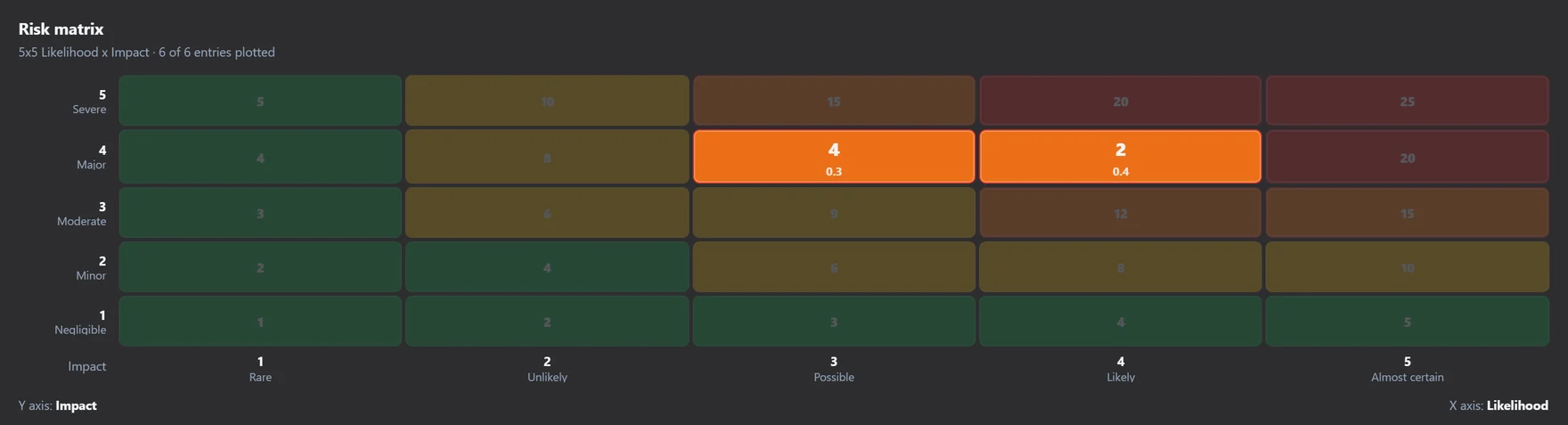
3×3, 5×5 and 7×7 likelihood and impact, FMEA S×O×D, AIAG-VDA Action Priority, and sector methods for MIL-STD-882E, ISO 26262 ASIL, IEC 61508 SIL and DO-178C DAL.
Risk appetite
Appetite bands map scores to levels and flag when a risk breaches appetite.
Treatment and controls
Accept, transfer, mitigate or avoid, with controls on a cause, event and effect spine, each with effectiveness, probability of failure on demand and independent protection layer flags.
Reconciliation queue
When sources change, review the difference and record the rationale for the registry's decision.
Attestations and audit trail
Risk owners attest to their entries, and snapshots and an audit trail record what changed.
Dashboards
Posture indicators, residual heatmap, risk matrix, risks by source module, asset and system hierarchy views and overdue actions.
Three levels of detail
Start minimal, then add treatment triggers and key risk indicators, or advanced fields such as velocity, confidence bands and benefit–risk.
Audit exports
Export hazard tracking reports in ISO 14971, ARP4761A, IEC 61511 and MIL-STD-882E variants, and the filtered table to Excel.
Risk narratives
Read each risk as cause, event and effect, and roll risks up by system breakdown.
Hazard study pathways
Assess study pathways without safeguards, with existing safeguards and as projected after actions.
AI assistance
- Propose a register entry from a source such as a hazard scenario, for you to review before it is published.
- Compare source score snapshots and suggest inherent inputs during reconciliation.
- Run the Risk Registry agent for reviews across the register.
AI proposals are drafts: you review and accept them before they enter your model.
Standards and methods
- ISO 31000
- IEC 31010
- MIL-STD-882E
- ISO 26262
- IEC 61508
- DO-178C
- AIAG & VDA FMEA
- ISO 14971
- SAE ARP4761A
- IEC 61511
ModelGraphX supports work done under these standards and methods; it does not certify compliance.
Who uses it
- Risk managers and project risk owners
- Safety and reliability engineers consolidating analyses
- Medical device teams working to ISO 14971
- Aerospace, automotive and defense programmes
- Asset owners managing operational risk
Works with
- Hazard Management
Hazards publish their posture with provenance.
- FMEA
FMEA risks arrive with their FMEA scores.
- Bowtie Analysis
Scored bowtie scenarios publish as snapshots.
- Case Desk
Cases with risk can be published as new or existing entries.
- Asset Management
Asset condition findings publish with provenance.
- Safety Case
Register entries serve as safety case evidence.
Frequently asked questions
- How is this different from a spreadsheet risk register?
- Each entry keeps a link to the analysis it came from and that analysis's original score. When the source changes, the entry is queued for reconciliation, and every decision has a recorded rationale, attestation and audit trail.
- Which risk matrices are supported?
- 3×3, 5×5 and 7×7 likelihood and impact matrices, FMEA S×O×D and AIAG-VDA Action Priority, plus sector methods for MIL-STD-882E, ISO 26262 ASIL, IEC 61508 SIL and DO-178C DAL that you enable in settings.
- How is residual risk calculated?
- The residual score is derived from the inherent score and the controls on the risk, using each control's effectiveness and probability of failure on demand.
- Does it calculate LOPA or ALARP?
- No. Controls can be flagged as independent protection layers, and ALARP is available as reference content and as a safety case argument pattern, but the registry does not perform a LOPA calculation or an ALARP computation.
Try it on a real project
Explorer is free, and new accounts get a 30-day trial of the paid capabilities.