Systems engineering
System structure: the model every analysis builds on
Model-based systems engineering in your browser. Describe your system's breakdown, parts and relationships once, or let AI draft them from your documents; requirements, FMEA, hazards, fault trees, bowties and risks then link to the same parts instead of copies in separate spreadsheets.
Overview
Every safety and reliability analysis depends on a shared understanding of what the system is: its parts, how they are composed and how they connect. System Structure holds that breakdown as a model, separate from the diagrams that show it, in the way common systems modelling software works.
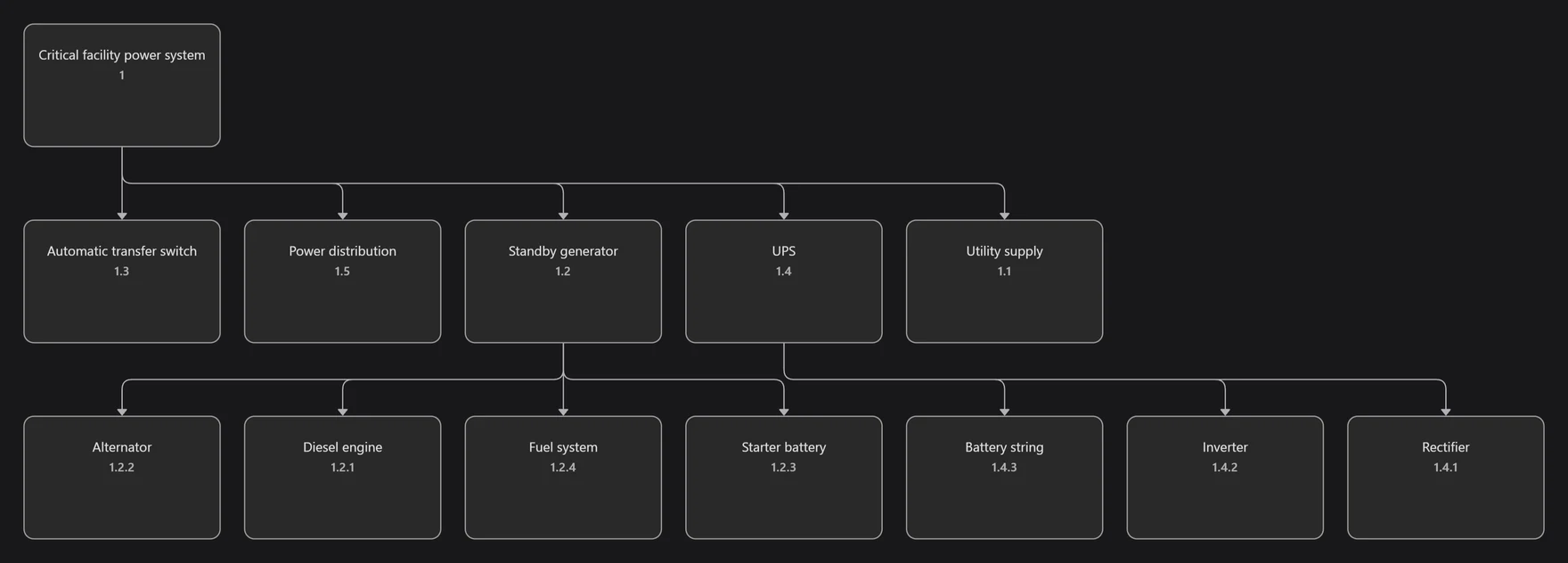
Each part is stored once in a repository tree of models, packages, parts and diagrams. A diagram shows a symbol of a part, and many diagrams can show the same part. Name, description, tags, custom fields and image live on the part and update everywhere; position, colours and fonts belong to each diagram.
Every line is a model relationship shared by all diagrams. Part-of is exclusive and acyclic, and system breakdown codes renumber automatically from it. Removing a symbol from a diagram and deleting a part from the model are separate actions, so a diagram edit never silently destroys model data.
Capabilities
Model and diagrams kept apart
Parts live once in a repository tree; diagrams show symbols of them, and one part can appear on many diagrams.
Live part data
Names, descriptions, tags, external IDs, custom fields and images change everywhere at once.
Relationships as model data
Part-of, interface, dependency and enabling relationships are shared by every diagram that shows them.
Safe editing
Remove from diagram and delete from model are separate, reconnecting a line moves its relationship, and undo restores model changes.
Automatic breakdown codes
System breakdown codes renumber from part-of relationships.
Table view
Filter parts, save custom columns and export the table to Excel.
Dashboard
Counts of parts and relationships, depth, relationship mix and cross-module links per part.
Linked items
See the cases, requirements, hazards, FMEA items, fault tree events, bowtie barriers, references and risks linked to each part.
Structure report
Export a structure report to Word, PDF or PowerPoint, and send the structure to composed reports.
Templates and activity
Reuse structures from templates, duplicate models, packages, diagrams or parts, and follow the activity log.
AI assistance
- Draft a system structure from a description or from uploaded documents such as PDF, Word, text, CSV, JSON or XML.
- Propose sub-parts for a selected part.
- Write a summary for the structure report that you accept or edit.
AI proposals are drafts: you review and accept them before they enter your model.
Who uses it
- Systems engineers and architects
- Safety and reliability engineers who need one source for the design
- Engineering consultants modelling client systems
- Students learning systems engineering
Works with
- Requirements
Requirements are allocated to parts by dragging them onto the system tree.
- FMEA
FMEA rows follow the system breakdown.
- Asset Management
Asset registries can import structure from here and link assets to parts.
- System Behavior
Swimlanes and functions link to the parts that perform them.
- Hazard Management
Hazards are allocated to the parts they apply to.
- Reports
The structure can be inserted into composed study documents.
Frequently asked questions
- Is System Structure a SysML tool?
- It follows the model and diagram separation and ownership rules of common systems modelling software, so parts are stored once and shown on many diagrams. It is not a full SysML authoring tool.
- Why keep the model separate from diagrams?
- So the same part can appear on several diagrams without duplicates, and changes to its data appear everywhere. Deleting a symbol from one diagram does not delete the part from the model.
- Can AI build the structure from our documents?
- Yes. The system agent drafts a structure from a description or uploaded documents for you to review, and can propose sub-parts for a selected part.
- How do other modules use the structure?
- Requirements, FMEA, hazards, fault tree events, bowtie barriers, assets and risks link to parts, and each part shows its linked items.
Try it on a real project
Explorer is free, and new accounts get a 30-day trial of the paid capabilities.