ModelGraphX
ModelGraphX is an integrated cloud platform for systems engineering, risk, safety, and dependability — one project workspace for modeling, analysis, assurance, and regulatory-ready deliverables.
What is ModelGraphX?
ModelGraphX is an integrated cloud platform for systems engineering, risk, safety, and dependability. Teams model systems, run structured analyses, publish to a central risk registry, and assemble regulatory-ready safety cases — in one project workspace with shared traceability.
Who is it for? Engineering teams and assurance leads who need collaborative analysis, audit-ready exports, and AI-assisted workflows without siloed spreadsheets.
Architecture
ModelGraphX is built on four connected foundations. The asset is the shared subject of every model and analysis. Systems engineering describes how it works, risk analysis explores how it could fail, and the knowledge base holds the evidence behind both.
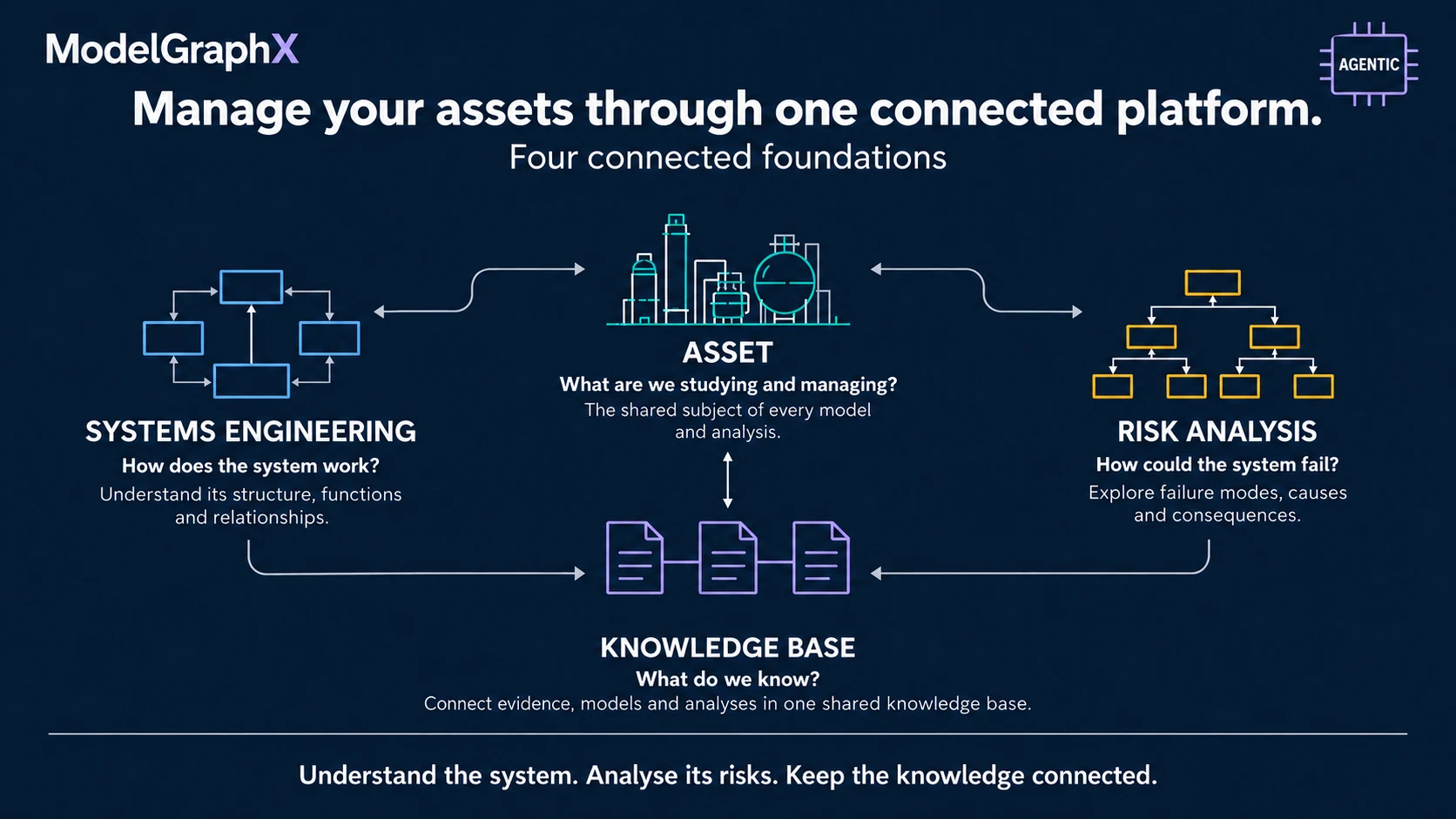
Asset
What are we studying and managing?
Modules: Asset Management and Map.
Systems engineering
How does the system work?
Modules: System Structure, System Behavior and Requirements.
Risk analysis
How could the system fail?
Modules: Hazard Analysis, FMEA, FTA, ETA, Bowtie, STPA / CAST and Dependability, with findings published to the Risk Registry.
Knowledge base
What do we know?
Modules: Reference Library and Knowledge Repository.
Where to start
Pick the path that fits what you have today. The paths combine: you can start from a template and then let an agent draft the FMEA.
Build the model yourself
- Describe what you are studying. Build the asset tree in Asset Management, or the architecture in System Structure.
- Analyse it. Add behavior and requirements to show how the system works, then use Hazard Analysis, FMEA, FTA or Bowtie to find how it could fail.
Start from a template
In Asset Management, choose From template. Essential Hydropower and Standard Hydropower are ready-made plants, and General Facility is a generic tree. FMEA, Bowtie and ETA have their own template libraries.
Let an AI agent draft it
Describe the system, or upload design documents, and an agent drafts the model for you: a system structure, an FMEA, a bowtie, an event tree or a process. Agents can ground their drafts in your Reference Library. Review every draft before you rely on it.
Key capabilities
Integrated workspace
Single project workspace with module rail, ribbon toolbars, and cross-module traceability.
Agent
In-app assistant for navigation, grounded help, and module commands.
Assurance outputs
Dashboards, regulatory exports, and regional cloud storage.
Risk & safety analysis
FMEA, FTA, Hazard, Bowtie, ETA, and Dependability modules with publish paths to Risk Registry.
Structured safety case
Claims–arguments–evidence workflows with regulatory HTML and DOCX export.