Software for project delivery
AI project management software for engineering teams
ModelGraphX Project Management puts AI agents inside the plan instead of beside it. They draft plans from scope documents, scan for delivery risks, turn meeting minutes into actions, compare estimates with finished work and answer what-if questions with the scheduling engine, while the plan, the risks and the analyses the project delivers stay in one place. People accept every change.
Overview
Most AI project tools are a chat window next to a schedule: they can describe a plan but do not know your dependencies, your resources or what went wrong last time. In ModelGraphX the agents read the plan itself, the resources booked on it, its costs and the risks recorded in finished projects you can read, and each answer points back to the rows, passages or results it is based on.
A what-if question in the Agent panel is turned into task delays and run on the what-if engine, so the finish dates, critical work and costs in the answer are calculated, not written by the model. The status report on the Dashboard is worded by AI but uses only the figures from the plan, the approved baseline, earned value and the risk register.
The scheduling underneath is complete: Gantt with four dependency types, approved baselines, critical path, automatic scheduling with preview and undo, resource levelling, Monte Carlo simulation with correlation groups, costs and cash flow, sprints, timesheets and a portfolio with automatic status. Plans come in and go out as MS Project XML.
Capabilities
AI plan drafts
Phases, tasks, milestones, links and roles proposed from a scope document, each row citing its passage.
AI risk agent
Threats, opportunities, responses and reassessments proposed from the plan, resources and costs, citing lessons from finished projects.
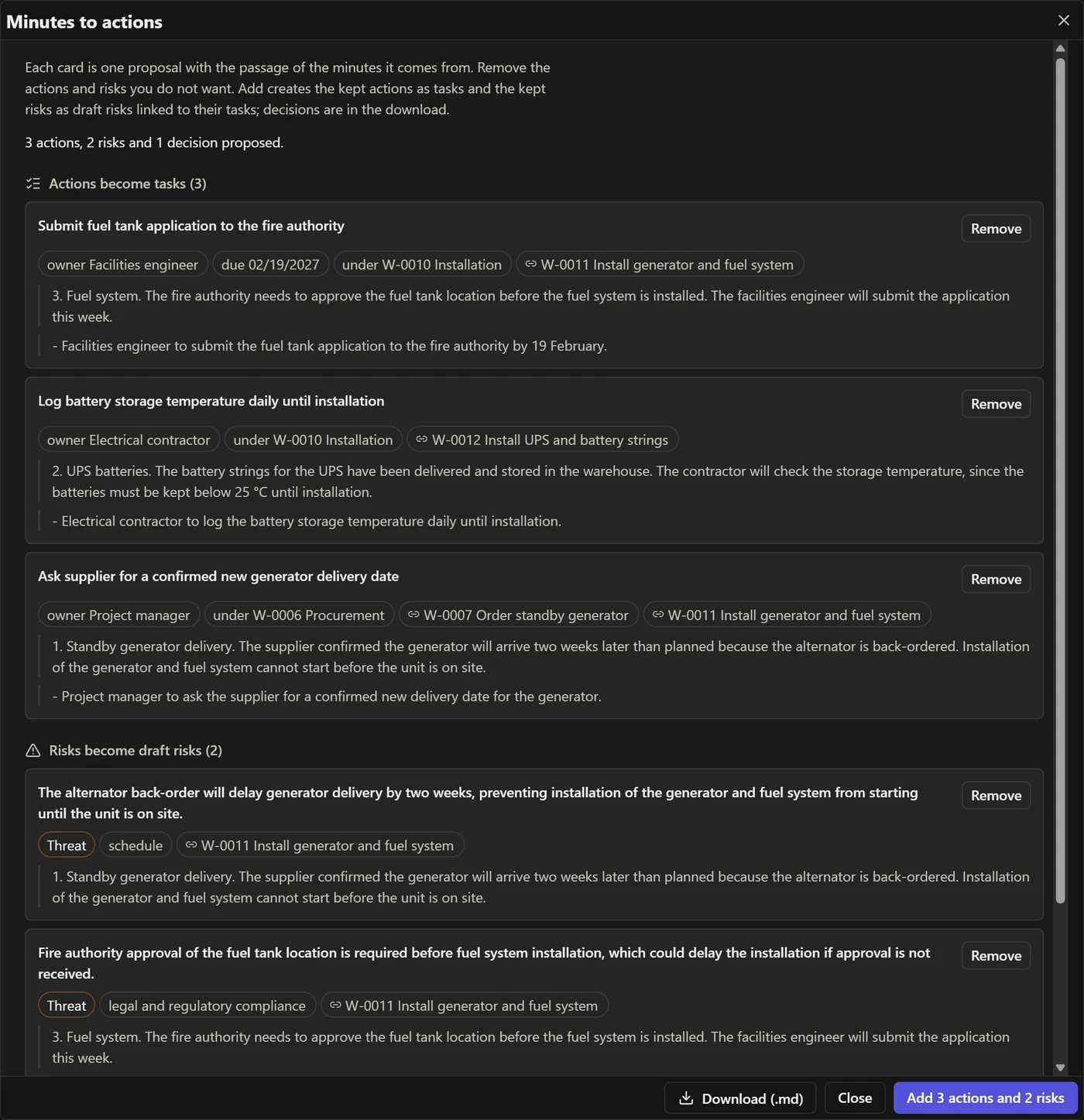
Minutes to actions
Action tasks, risks and decisions proposed from meeting minutes, each quoting its passage.
What-if answers from the engine
Questions in the Agent panel and the What-if tab show the moved finish, critical work and cost effect without changing the plan.
Estimate checks
Open durations compared with similar finished tasks, with estimates below the comparables flagged.
Schedule risk
Monte Carlo finish-date and cost distributions, the chance of meeting a deadline and a proposed contingency.
Planning and control
Gantt, baselines, critical path, levelling, costs, sprints, timesheets and a portfolio in one module.
Traceability to engineering
Tasks link to requirements and verification cases, and delivery risks publish to the Risk Registry.
AI assistance
- Every AI proposal cites its source and waits for a person to accept or reject it.
- Numbers in what-if answers, simulation results and status reports come from the plan's own calculations.
- AI use is metered in credits, with a monthly allowance in every plan.
AI proposals are drafts: you review and accept them before they enter your model.
Who uses it
- Engineering and project managers
- PMO and portfolio leads
- Planners and project controllers
- Teams looking for an MS Project alternative with AI
Works with
- Project Management
The Project Management module page lists every capability and AI agent.
- Risk Registry
Delivery risks are published to the Risk Registry.
- Resources & Capacity
People and equipment are booked through Resources & Capacity.
- Requirements
Work links to requirements and verification cases.
- AI assistance
How the AI agents across ModelGraphX cite sources and wait for review.
Frequently asked questions
- What is the best AI project management software for engineering projects?
- It depends on what the project delivers. ModelGraphX suits engineering work where the plan has to stay connected to requirements, hazards and risks: its AI agents work on the plan itself, cite their sources and wait for a person to accept each change.
- Does the AI change my plan on its own?
- No. Plan drafts, risk proposals, actions from minutes and estimate changes are proposals. Nothing is added or changed until a person accepts it, and accepted items record who accepted them.
- Can it replace MS Project?
- It imports and exports MS Project XML (MSPDI) and covers Gantt, dependencies, baselines, critical path, automatic scheduling, resources, costs and Monte Carlo simulation. Native .mpp files must be saved as XML first.
- Can I try it before buying?
- Yes. New accounts get a 30-day trial of the paid capabilities. On Business and Enterprise workspaces, people who only need to read a plan join as free read-only viewers.
Try it on a real project
Explorer is free, and new accounts get a 30-day trial of the paid capabilities.